The computer can be a tutor in effect relieving the teacher
of many activities in his/her personal role as classroom tutor. It should be
made, however that the computer cannot totally replace the teacher since the
teacher shall continue to play the major roles of information deliverer and
learning environment controller. Even with the available computer and CAI
software, the teacher must insure that students have the needed knowledge and
skills for any computer activity. The teacher also decides the appropriate
learning objectives, plan the sequential and structured activities to achieve
the objectives and evaluate the students' achievement by way of tests.
Saturday, February 6, 2016
Lesson 9: COMPUTER AS INFORMATION AND COMMUNICATION TECHNOLOGY
Instructional media consist of audio-visual aids that served
to enhance and enrich the teaching- learning process. Examples are the
blackboard, photo, film and video. On the other hand, educational communication
media comprise the media of communication to audiences including learners using
the print, film, radio and television or satellite means of communication. For
example, distance learning were implemented using correspondence, radio,
television or the computer satellite system.
Lesson 8: HIGHER THINKING SKILLS THROUGH IT-BASED PROJECTS
There are four types of IT-based projects which
can effectively be used in order to engage students in activities of a higher
plane of thinking. (1)The Resource-based Projects, the teacher steps out
of the traditional role of being an content expert and information provider, and
instead lets the student find their own facts and information. (2)Simple
Creations, they can create their software materials to supplement the need for
relevant and effective materials. (3)Guided Hypermedia Projects is
production of self-made multimedia projects can be approached in two different
ways: As an instructive tool, such as in the production by students of a
PowerPoint presentation of a selected topic. As a communication tool, such as
when students do a multimedia presentation like graphs, photos, interviews and
video clips. (4) Web-Based Projects, students can be made to create
and post web pages on a given topic. Creativity projects as tools in the
teaching-learning process can be achieved with the assistance of advisers adept
in the technical use of Internet Resources.
Lesson 7: IT FOR HIGHER THINKING SKILLS AND CREATIVITY
In the traditional information absorption model of teaching,
the teacher organizes and presents information to student- learners. He may use
a variety of teaching resources to support the lesson. The presentation is
followed by discussion and the giving of assignment. Today, students are
expected to be not only cognitive but also flexible, analytic and creative.
Lesson 6 - Developing Basic Digital Skills
Teachers
in the modern times are rapidly improving particularly on their way of teaching
to match the new digital world of information and communication technology
(ICT). In developing a digital learner, it must be clear to them on what basic
knowledge, skills and values which need to be developed. These basic literacy
will not replace the 3 R’s (reading, writing, arithmetic) instead they will
complemented by six essential skills namely: Solution fluency that focuses on
to learners capacity and creativity in problem solving, Information fluency
that involves the ability to access information, retrieve and reflect on the information,
Collaboration fluency that talks about teamwork, Media fluency in
communication, Creativity fluency in artistic proficiency and Digital ethics
that states about the different principles of leadership, global responsibility
and citizenship, environmental awareness and personal accountability.
Friday, January 8, 2016
Lesson 5 - Preferences of the Technology Generation
What
the old generation likes may not be the same as what the new generation prefers
in their life, work and leisure. Sad to say, much of the good things enjoyed by
elders when they were students are no longer available to the new generation.
The
state dictates educational priorities based on perceptions on the country’s
need to strengthen its agricultural, business or industrial economy.
In
the field of education, it is important that critical differences in perception
between old and young which create a generation gap:
·
Texts
versus Visual
·
Linear
versus Hyper media
·
Independent
versus Social learners
·
Learning
to do versus learning to pass the test
·
Delayed
rewards versus instant gratification
·
Rote
memory versus fun learning
In
sum, teachers need to connect with digital learners, and not think of them as
entering their past-30 years old traditional world. While there are apparent
setbacks or limitations to digital learning, there are opportunities to tap
through:
·
visual
learning
· hyper linked multimedia
·
problem-solving
activities
Reflection:
Preferences of the Technology as an
instructional media were indeed a very big help in the new generation learners
but we must know as a teachers what the appropriate use of it. We must also
know when and how to limit these technologies in order for us to prevent our
learners to become abusive and addicted to it.
Tuesday, January 5, 2016
Lesson 4 - Bridging Generation Gap
The
older generation often feels there is a generation gap between them and the
younger generation. This is apparent in simple things like the manner of
dressing, socializing, more intimate relationship like friendship and etc.
Still, some old things are difficult to overcome, as there are still the caste
system in India, pre-arranged marriage in China, female circumcision in Africa,
and theocratic or religion-rule societies in the Middle East. Even in
education, traditional schooling has hardly changed even with the clear
evidence of a digital world. Reflect on how some teachers confine their
teaching to the board talk-test method.
In
the field of education, a huge generation gap also exists and it will continue
to widen unless some changes are adopted at the proper time. In peasant third
world countries where schools don't have technology facilities, it is
understandable that the transition to digital education may take time. But
given the rapid emergence of digital technology, at times referred to as information
and communication technology (ICT), there is the need to prepare for bridging
the digital gap in society.
First,
we need to understand the potentials of ICT:
- The new network of instantaneous communication is global, overcoming borders between countries and continents.
- Much of what elders believe may not be applicable anymore to the new generation, especially along matters of traditional value system.
Given
the speed and power of ICT for change, growth, innovation, it becomes critical
that teachers understand the gap that may be perceived between them and the new
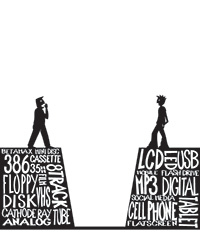
generation of learners. Much of the old technology such as tube radio, platter
records, cassette tapes, celluloid movies, antenna television, landline phones,
have vanished or are quickly vanishing today. Even in communication, sending a
written letter has become tedious with the advent of emailing and web-camera
face-to-face communication. As sophisticated technology advances at a dizzying
pace, the complacency of educators to stick to traditional education system and
approaches become futile, if not retrogressive.
Since the new generations are expected to face a future professional
challenge of a digital world ahead of them, technology-supported skills need to
be taught in schools today, or else schools will become a white elephant. If
schools fail to respond to emergent changes and needs, new learners may lose
appreciation of the educational system, and drop out of schools, as surveys
show an increasing drop-out rate every year. Learning at home and availing
digital learning systems like the Open Universities may save the day, but the
situation remains bleak for schools stolidly adhering to the old educational
system.
Subscribe to:
Posts (Atom)